
Reflected Color vs. Projected Color
Reflected Color (Ink): Reflected color is the color we see when light bounces off an object. For example, a red apple looks red because it reflects red light and absorbs other colors.
Example: When you look at a printed photo or a painting, the colors you see are from light reflecting off the ink or paint.
Projected Color (Screen): Projected color is the color we see from light-emitting sources like computer screens, phones, and TVs. These devices use red, green, and blue (RGB) light to create different colors by mixing these three colors in various amounts.
Example: When you look at an image on your computer or phone screen, the colors are made by the light coming from the screen’s pixels, which mix red, green, and blue light.
Color Representation in Digital Images
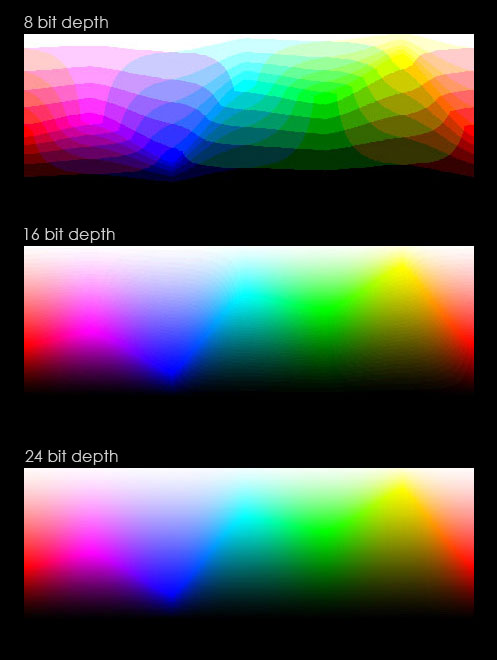
Indexed Color: Indexed color uses a limited set of colors to represent an image. Instead of storing the color for each pixel, it uses a palette of colors (usually 256 or fewer) and stores an index to the palette for each pixel. This makes the file size smaller and is often used in GIF images.
Example: A GIF image with 256 colors uses indexed color, making it more efficient for web use.
24-Bit Color: 24-bit color, also known as true color, represents images using 24 bits per pixel. This allows for over 16 million possible colors (2^24). Each pixel’s color is defined by three 8-bit values for red, green, and blue. This method provides a high level of color detail and is used in digital photography and high-quality images.
Example: A high-resolution JPEG photo uses 24-bit color to show rich and detailed colors.
Conclusion
Understanding the difference between reflected and projected color, as well as how color is represented in digital images, is important for anyone working with visual media. Whether you’re designing for print or digital, knowing these concepts will help you create more accurate and vibrant visuals.
From Copilot
Prompt: How does color work? Reflected color vs projected color and color representation in digital images.
Response:
Color can be perceived through reflected light, like the colors we see on printed materials, or through projected light, like the colors on digital screens. Reflected color occurs when light hits an object and certain wavelengths are reflected back to our eyes, while projected color is created by combining red, green, and blue light in various intensities on screens. In digital images, color can be represented using indexed color, which uses a limited palette, or 24-bit color, which allows for millions of colors and provides high detail. Understanding these concepts is essential for creating accurate and vibrant visuals in both print and digital media.